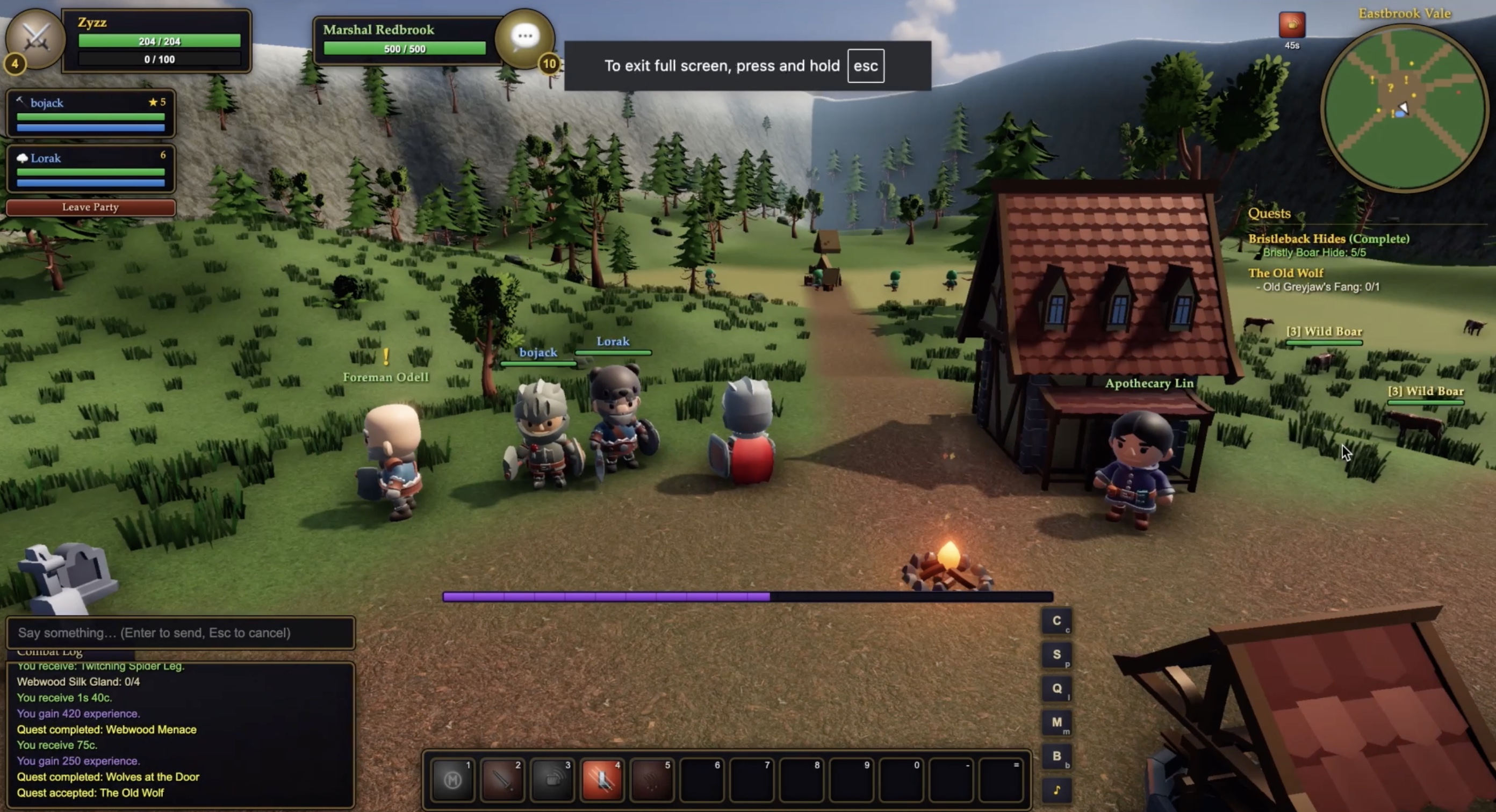
What Is World Of Claudecraft?
World of Claudecraft is a small 3D fantasy MMO that runs in the browser and borrows the rhythm of classic tab-target RPGs: create a character, pick up quests, fight mobs, loot gear, visit vendors, and travel through a growing world.
The project has drawn attention because it feels unusually complete for an experimental game: there are classes, abilities, maps, bags, chat, parties, trades, duels, and group content. Community reactions have been mixed in a useful way. Some players are impressed that a playable world exists at all; others point out that movement, polish, performance, and mobile comfort still need iteration.
Browser RPG
Classic MMO feel
Online or solo
Community-built
Play Online
World Of Claudecraft online play is for people who want the world to feel inhabited. You sign in, keep a character, and share the realm with other players who can chat, group, trade, duel, and run content together.
- Your character can keep level progress, equipment, money, bags, quests, and location.
- Other players can appear in town, on roads, at quest hubs, or around dangerous pulls.
- Party play matters for shared fights, kill credit, group chat, and harder encounters.
- Trades and duels make the online world feel more like a social RPG than a solo demo.
Play Offline in Browser
World Of Claudecraft offline play is the quickest way to try the game. You pick a name and class, then enter a solo version of the world without making an account or waiting for anyone else to join.
Use offline mode when you want to learn movement, test class abilities, read quests at your own pace, or see whether the game works well on your device. It is less social, but it is the most direct path from loading the page to playing.
The solo flow is useful when comparing animations, checking frame rate, or deciding whether the combat loop feels comfortable before returning later.
- No sign-in before the first pull.
- No shared chat, party invites, trades, or duels.
- Best for first impressions, class testing, and quick exploration.
Controls
The game uses a classic keyboard-and-mouse layout. The Play Now button opens the quick browser session, and the table below covers the main controls once you are inside the world.
World Of Claudecraft controls stay close to classic MMO habits, so movement, targeting, interaction, and action-bar play should feel familiar after a short session.
It also keeps most interface actions on familiar keys, which makes combat, chat, bags, maps, and quest tracking easier to learn together.
World Of Claudecraft works best when you match the controls to your device. On touch screens, start with short sessions and use interface buttons when they are easier than keybinds. On desktop or iPad with a keyboard, the full layout gives you faster access to targeting, camera movement, spell use, and window management during longer fights or dungeon pulls.
Inputs are grouped by travel, targeting, combat, interface windows, and communication so new players can scan for the moment they are trying to solve.
| Input | Action |
|---|
| Play Online | Open the account flow, choose or create a character, then enter a shared realm with other players. |
| Play Offline | Skip sign-in, choose a name and class, and start a solo browser session immediately. |
| W | Move forward. Hold it while steering with the mouse for the smoothest travel. |
| S | Backpedal. Useful for small positioning changes, but slower than turning and running. |
| A / D | Turn left or right. When right mouse is held, A and D become strafe controls. |
| Q / E | Strafe left or right while keeping your camera direction steady. |
| Right drag | Control the camera and character facing together for MMO-style mouselook. |
| Left drag | Orbit the camera around your character without immediately changing facing. |
| Mouse wheel | Zoom the camera in or out to inspect combat, terrain, and nearby players. |
| Space | Jump while moving through roads, camps, and uneven terrain. |
| Tab | Cycle nearby enemies when you need a target quickly. |
| Left click | Select a player, creature, NPC, object, corpse, or UI element. |
| Right click | Attack an enemy, loot a corpse, talk to an NPC, or interact with a usable target. |
| 1-9, 0, -, = | Use action bar slots for attacks, spells, buffs, heals, and class abilities. |
| F | Interact with the selected target, including loot, quest objects, and NPC dialog. |
| C | Open the character panel to review equipment and stats. |
| P | Open the spellbook to review learned abilities and class tools. |
| L | Open the quest log and check current objectives. |
| M | Open the world map for zone orientation. |
| B | Open bags to view items, gear, and loot. |
| V | Toggle nameplates so nearby units are easier to read in crowded fights. |
| R | Toggle autorun for longer road travel. |
| Enter | Open chat. Use it for normal chat, party chat, whispers, and zone conversation. |
| Esc | Close windows, clear the current target, open the menu, or rebind keys. |
Classes
World Of Claudecraft has nine class archetypes. Pick by the kind of moment you enjoy most: holding attention, healing mistakes, fighting from range, bursting a target, or controlling space.
The list below focuses on gameplay rhythm rather than exhaustive balance, making it easier to compare how each archetype feels in the first session.
- Warrior: direct melee pressure with rage, Charge, Rend, Thunder Clap, Execute, and strong front-line pacing.
- Paladin: durable holy fighter with seals, Judgement, auras, Blessing of Might, stuns, and clutch healing.
- Hunter: ranged weapon play with Auto Shot, stings, Arcane Shot, Concussive Shot, and tools for kiting.
- Rogue: energy and combo points for quick openers, Backstab, Gouge, Sprint, and Eviscerate finishers.
- Priest: steady caster support with Smite, Fortitude, Shadow Word: Pain, shields, Renew, and direct heals.
- Shaman: hybrid pressure with Lightning Bolt, shocks, weapon imbues, Lightning Shield, Stormstrike, and emergency healing.
- Mage: fragile but explosive caster with Fireball, Frostbolt, Arcane tools, Polymorph, and conjured water.
- Warlock: damage-over-time pressure with Shadow Bolt, Immolate, Corruption, Life Tap, Drain Life, and curses.
- Druid: flexible nature kit with Wrath, Moonfire, Rejuvenation, roots, Thorns, Healing Touch, and Bear Form.
Online vs Offline
Both World Of Claudecraft modes are recognizably the same game, but they answer different player needs. Online is the persistent, social path. Offline is the quick, solo path.
Choose by the kind of session you want today: fast learning, shared progress, social discovery, or a quiet test of controls and class pacing.
| Feature | Online | Offline |
|---|
| Start | Sign in, choose a character, then enter the realm. | Choose a name and class, then begin immediately. |
| Progress | Designed for returning to the same character later. | Designed for quick sessions and first impressions. |
| Players | Other players can appear, chat, group, trade, and duel. | You play alone in your own browser session. |
| Best mood | A living RPG space with social friction and shared moments. | A quiet test run where you can learn without pressure. |
| Good for | Playing with friends, trying group content, and following a character over time. | Checking controls, testing classes, and exploring before committing. |
World Of Claudecraft vs micro-MMO
A micro-MMO is smaller than a commercial massively multiplayer game, but it should still feel like more than a combat demo. World of Claudecraft fits that label because it compresses familiar MMO loops into a browser-sized world: class identity, quest hubs, shared chat, party pulls, loot, vendors, maps, death runs, and group dungeons.
The difference is scope. This game does not try to be an endless live-service world; it focuses on a compact route through Eastbrook Vale, Mirefen Marsh, and Thornpeak Heights, then layers in enough social systems for players to recognize the MMO shape. That is why community discussion often circles the same question: it is small and rough, but it already behaves like a micro-MMO rather than a static showcase.
Zones and Dungeons
World Of Claudecraft starts in Eastbrook Vale, a low-level zone with town services, roads, camps, wildlife, bandits, a ruined chapel, graveyard routes, and early class practice. The road then moves into Mirefen Marsh and Thornpeak Heights, giving the game a three-zone arc instead of a single test field.
The dungeon path adds structure: Hollow Crypt is a five-player elite instance tied to the Gravecaller storyline, while Sunken Bastion and Gravewyrm Sanctum push the later game toward add waves, elite pulls, bosses, and rare weapon rewards. The result is a small browser RPG with a beginning, middle, and late-game destination.
These areas give the route enough shape for questing, recovery, vendors, travel decisions, and a few memorable danger spikes.
FAQ
Is World Of Claudecraft free to play?
Yes. The game can be played in the browser without buying a client or installing a launcher, which makes it easy to try a first session before deciding how deeply you want to explore.
Can I play World Of Claudecraft without an account?
Yes. Use offline play if you want to choose a class and enter the world quickly without signing in. This is the best route for testing movement, reading early quests, and learning combat at your own pace.
Does World Of Claudecraft work on mobile?
Yes. It supports desktop, mobile, and iPad browsers, so you can start playing on the device you have with you. Larger screens still give you more room for combat, maps, bags, and chat, but the page is built to support all common device sizes.
What kind of game is World Of Claudecraft?
It is a small fantasy RPG with MMO-style controls, classes, quests, loot, chat, parties, and dungeons. The appeal is that familiar genre loop in a lightweight browser format rather than a large client download.
Which class should I choose first?
Choose Warrior or Paladin if you want a direct melee start, Mage or Hunter for ranged play, and Priest or Shaman if you enjoy support tools. Rogue, Warlock, and Druid are good picks when you want a more specialized rhythm.
What is the difference between online and offline play?
Online play lets you share the realm with other players, while offline play is faster for learning at your own pace. Pick online for social play and returning progress; pick offline for a quick first look.
Do I need to download anything?
No. The game runs in the browser, so you can start from the page instead of downloading a separate game client. A modern browser and stable connection are enough for the first try, and keeping the tab active helps the world load smoothly on slower connections too.
Can I host my own World Of Claudecraft realm?
Yes. Players who want a private realm can follow the project setup guide and run their own version for testing or friends. A private realm is useful when the same group wants to return, experiment, and keep progress together.
How to Self-Host
Self-hosting World Of Claudecraft is for players who want a private realm for friends or a place to experiment with their own changes. Start from the GitHub repository, follow the latest setup guide there, and treat your realm like a small community space rather than a throwaway session.
Before inviting friends, test character creation, combat, chat, and logout behavior with a small group so problems are easy to spot.
1. Open the GitHub repository
2. Follow the current setup guide
3. Start your private realm
4. Share the play link with your group
- Use a private realm when you want the same group to return and keep playing together.
- Keep your copy updated as the project changes.
- Save character data regularly if long-term progress matters to your group.
- Check GitHub issues when setup steps or known problems change.